
AWS KMS: Multi-Tenants, shared hardware; only for symmetric keys
AWS CloudHSM: Dedicated hardware; FIPS 140-2 Compliance; Both symmetric and asymmetric keys
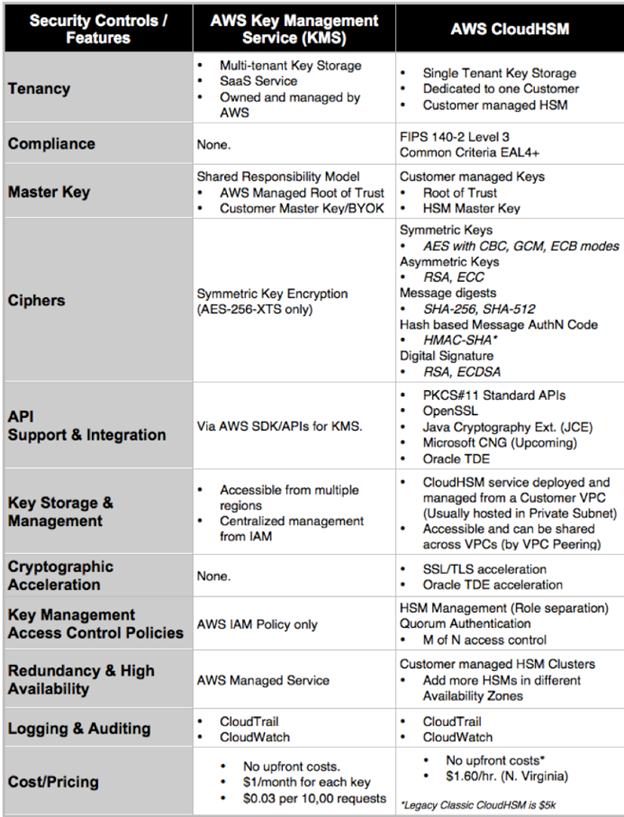
AWS KMS: Multi-Tenants, shared hardware; only for symmetric keys
AWS CloudHSM: Dedicated hardware; FIPS 140-2 Compliance; Both symmetric and asymmetric keys
AWS SSO Supported Applications:
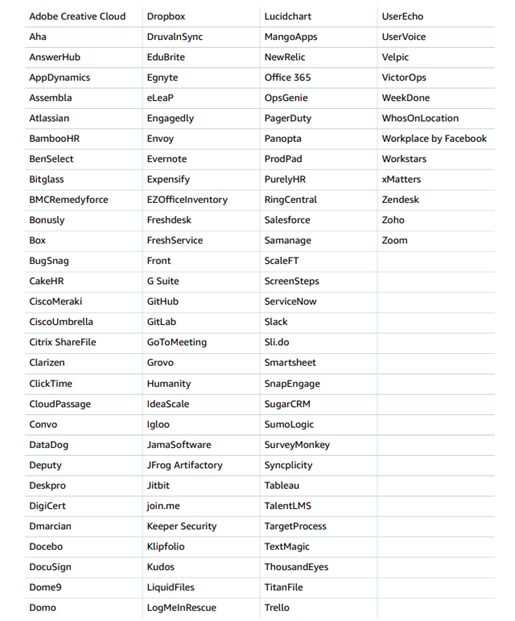
Reference: https://docs.aws.amazon.com/IAM/latest/UserGuide/id_roles_providers_enable-console-saml.html
Amazon Web Services recently introduced a new feature that lets administrators block public access to their data on S3.
The feature, called “Amazon S3 Block Public Access,” is really a group of four security settings that administrators can turn on or off across their entire AWS account or on a per-bucket basis. Once the settings are turned on, they apply to the user’s current environment, as well as to any buckets they create in the future.
The settings — which can be accessed via the S3 console, the command-line interface or the S3 API — are as follows:
Reference: https://docs.aws.amazon.com/AmazonS3/latest/dev/access-control-block-public-access.html
Amazon Web Services unveiled its latest updates to security on its cloud services platform at AWS re:Invent 2018: AWS Security Hub.
AWS Security Hub provides you with a comprehensive view of your security state within AWS and helps you check your compliance with the security industry standards and best practices. Security Hub collects security data from across AWS accounts, services, and supported third-party partners and helps you analyze your security trends and identify the highest priority security issues.
When you enable Security Hub, it immediately begins consuming, aggregating, organizing, and prioritizing findings from AWS services, such as Amazon GuardDuty, Amazon Inspector, and Amazon Macie, and from AWS partner security solutions. Security Hub also generates its own findings as the result of running automated and continuous compliance checks using AWS best practices and supported industry standards (in this release, CIS AWS Foundations). Security Hub then correlates findings across providers to help you prioritize the most significant ones and consolidates these findings into actionable graphs and tables.
Security Hub also allows you to create insights – collections of related findings defined by an aggregation statement and optional filters. An insight identifies a security area that requires attention. Security Hub comes with several managed (default insights) and, in addition, you can create your own custom insights.
Currently, AWS Security Hub is in Preview release.
Reference: https://aws.amazon.com/security-hub/
AWS Organizations now supports AWS License Manager; a service that makes it easier for customers to bring their existing software licenses to AWS cloud, and manage licenses across their hybrid environments seamlessly, across AWS and on premises. Customers can now manage licenses across their AWS accounts centrally. They can create licensing rules in their master account, easily attach them to resources in member accounts, and track usage of licenses across their AWS accounts centrally, using License Manager’s built-in dashboard.
Reference: AWS License Manager
Amazon Elasticsearch Service is now HIPAA Eligible. You can now use Amazon Elasticsearch Service to store and analyze protected health information (PHI) and build HIPAA compliant applications.
Amazon Elasticsearch Service is now in-scope of AWS’ PCI DSS which will allow you to store, process, or transmit cardholder data using the service. Additionally, Amazon Elasticsearch Service is in-scope of AWS’ ISO 9001, 27001, 27017, and 27018 certifications. PCI DSS and ISO are among the most recognized global security standards for attesting to quality and information security management in the cloud.
Reference: HIPAA Eligible
 AWS Security Digest & Notes